
Once you have your music playlist, you are ready to add this to the HUG music player by following the steps below. Please note that when you buy a HUG there is no music stored on it – it’s all ready for you to add your own!
- Switch on the heartbeat on the unit.
- Plug the USB cable provided into the unit and connect this to the USB port on your computer.
- The unit shows as a ‘drive’ on your computer.
- Add your MP3 music files onto the drive.
- Once finished, eject safely from your computer and unplug the cable.
- Switch the heartbeat off and on again, and the music will play.
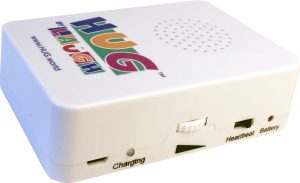

Listening to music, nature sounds, stories or poems can really lift a person’s spirits. Sound files can easily be uploaded onto HUG’s music player. Music can change your mood or transport you back to a different moment in your life in an instant. We’ve teamed up with Playlist for Life to guide you in creating your own playlist for HUG. Use their resources to create your playlist and then add the music files to HUG. You will discover how a person’s personalised playlist of music can evoke memories, bring connection and joy!